Neos Flow Middleware Tutorial: understanding and applying PSR-15

02/2026
10 reading time
Summary
What is a Middleware?
In the context of PSR (PHP Standards Recommendation) and web applications, middleware is a standalone component that receives an HTTP request, optionally modifies or processes it, and then either returns an HTTP response itself or forwards the request to the next middleware.
Why is it important for Neos Flow?
Middlewares are important in Neos Flow because they are a central component of the PSR-based architecture of web applications. They can be used, for example, to check whether a user is authenticated and/or authorized before performing a security-critical action such as changing their password (SecurityEntryPointMiddleware). Middleware can also be used to store flash messages (e.g., in the Neos CMS dashboard: “File Dummy.pdf has been added.”) in the cookie so that they can be displayed in the browser (FlashMessageMiddleware).
Possibilities offered by middleware:
Authentication & authorization
Check whether a user is logged in or has the necessary rights
Security & protective measures
Set additional headers (content security policy, X-Frame-Options, etc.)
Logging & monitoring
Write every request or specific events to the log.
Measure performance (e.g., time from request to response).
Request and response manipulation
Add/change query parameters or headers
Set or evaluate cookies
Adjust the response body before it is returned
Maintenance mode or feature flags
Return a maintenance page instead of the normal page
Activate certain features only for test users
How middlewares works in Neos Flow
Here is a sequence diagram showing how middleware is classified in Neos Flow:
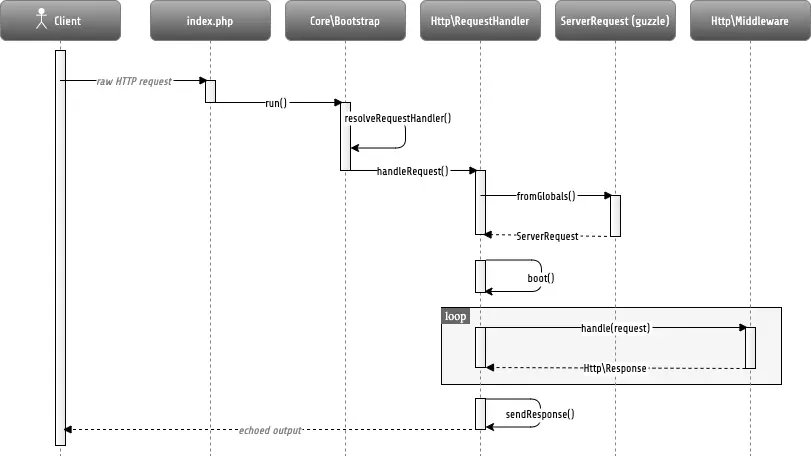
Quelle: Flow Framework > HTTP Foundation
In simple terms, the diagram can be summarized as follows: The browser sends a request to the server. There, a suitable RequestHandler takes over and creates a PSR-7 request object from the request. This object contains all relevant information from the original HTTP request and is then routed through the middleware chain implemented according to PSR-15.
PSR-7 defines standardized PHP interfaces for HTTP messages, i.e., for requests, responses, streams, URIs, and uploaded files. This provides a common, framework-independent basis for working with HTTP objects. The objects are immutable, which means that any change creates a new instance, thus guaranteeing consistent behavior.
PSR-15 builds on these PSR-7 interfaces and defines how middleware and request handlers look in the server context. A middleware receives a PSR-7 request object and decides whether to return a response itself or forward the request to the next handler. This creates a clearly defined and compatible middleware chain that works independently of the framework used.
How do you implement middleware in Neos Flow?
If you want to create your own middleware, you must implement the Psr\Http\Server\MiddlewareInterface. This interface defines the process method:
<?php

namespace Vendor\Package\Http;

use Psr\Http\Message\ResponseInterface;
use Psr\Http\Message\ServerRequestInterface;
use Psr\Http\Server\MiddlewareInterface;
use Psr\Http\Server\RequestHandlerInterface;

// A sample HTTP middleware that adds a custom header to the response
final class SomeMiddleware implements MiddlewareInterface
{
	public function process (ServerRequestInterface $request, RequestHandlerInterface $next): ResponseInterface {
		$response = $next->handle($request);
		return $response->withAddedHeader ('X-MyHeader', '123');
	}
}
To activate the new middleware, it must be configured in Settings.yaml:
Neos:
  Flow:
    http:
      middlewares:
        'custom':
          position: 'before dispatch'
          middleware: 'Vendor\Package\Http\SomeMiddleware'
In the position option, you can specify where in the middleware chain the new middleware should be processed. Use ./flow middleware:list to find all active middleware:
$ ./flow middleware:list
Currently configured middlewares:
+----+---------------------+-----------------------------------------------------------------+
| #  | Name                | Class name                                                      |
+----+---------------------+-----------------------------------------------------------------+
| 1  | standardsCompliance | Neos\Flow\Http\Middleware\StandardsComplianceMiddleware         |
| 2  | trustedProxies      | Neos\Flow\Http\Middleware\TrustedProxiesMiddleware              |
| 3  | methodOverride      | Neos\Flow\Http\Middleware\MethodOverrideMiddleware              |
| 4  | session             | Neos\Flow\Http\Middleware\SessionMiddleware                     |
| 5  | ajaxWidget          | Neos\FluidAdaptor\Core\Widget\AjaxWidgetMiddleware              |
| 6  | detectSite          | Neos\Neos\FrontendRouting\SiteDetection\SiteDetectionMiddleware |
| 7  | routing             | Neos\Flow\Mvc\Routing\RoutingMiddleware                         |
| 8  | poweredByHeader     | Neos\Flow\Http\Middleware\PoweredByMiddleware                   |
| 9  | flashMessages       | Neos\Flow\Mvc\FlashMessage\FlashMessageMiddleware               |
| 10 | parseBody           | Neos\Flow\Http\Middleware\RequestBodyParsingMiddleware          |
| 11 | securityEntryPoint  | Neos\Flow\Http\Middleware\SecurityEntryPointMiddleware          |
| 12 | dispatch            | Neos\Flow\Mvc\DispatchMiddleware                                |
+----+---------------------+-----------------------------------------------------------------+
The new middleware would be activated between securityEntryPoint and dispatch.
A middleware implementation in Neos Flow offers various possibilities: You can interrupt the middleware chain, exchange data between middlewares, define individual options, and much more. Further details can be found here: https://flowframework.readthedocs.io/en/8.3/TheDefinitiveGuide/PartIII/Http.html#interrupting-the-chain
Practical Examples
Logging middleware for certain Flow contexts
<?php

namespace Vendor\Package\Http;

use Neos\Flow\Annotations as Flow;
use Psr\Http\Message\ResponseInterface;
use Psr\Http\Message\ServerRequestInterface;
use Psr\Http\Server\MiddlewareInterface;
use Psr\Http\Server\RequestHandlerInterface;
use Psr\Log\LoggerInterface;

// A middleware that logs all requests if they are in development context
class LoggingMiddleware implements MiddlewareInterface
{
	#[Flow\Inject] protected LoggerInterface $logger;

	#[Flow\InjectConfiguration(path: "core. context", package: "Neos.Flow", type: "Settings")]
	protected string $context = "Development";

	public function process (ServerRequestInterface $request, RequestHandlerInterface $handler): ResponseInterface
	{
		if ($this->context== "Development/Docker") {
			$this->logger->info("Incoming request: Method -> " . $request->getMethod() . "; Query -> " . $request->getUri()->getQuery());
		}

		return $response = $handler->handle($request);
	}
}
Maintenance mode middleware
<?php

namespace Vendor\Package\Http;

use Neos\Flow\Annotations as Flow;
use Psr\Http\Message\ResponseInterface;
use Psr\Http\Message\ServerRequestInterface;
use Psr\Http\Server\MiddlewareInterface;
use Psr\Http\Server\RequestHandlerInterface;
use Psr\Log\LoggerInterface;
use Vendor\Package\Http\MaintenanceResponse;

// A middleware that creates a maintenance response if in maintenance mode and not permitted user
class MaintenanceMiddleware implements MiddlewareInterface
{
	#[Flow\InjectConfiguration(path: "core.maintenanceActive", package: "Vendor.Package", type: "Settings")]
	protected bool $isMaintenanceActive = false;

	public function process (ServerRequestInterface $request, RequestHandlerInterface $handler): ResponseInterface
	{
		$clientIp = $request->getServerParams()['REMOTE_ADDR'] ?? '';

		if (!$this->isMaintenanceActive || $clientIp === "123.123.123.123") {
			return $handler->handle($request);
		}

		return new MaintenanceResponse();
	}
}